
Frequently Asked Questions
We get lots of mail and always want to answer your inquiries. That's why we created this mini FAQ page for the most commonly asked questions. Just click on any question to display the answer inline on the page.
Problem releated to java base simulation
Check whether your browser enabled java or not?
How to install JRE for your browser?For Window os user (only for Firefox and chrome browser)
- To download JRE for installation go to this link.
- Accept Licence agreement and download windows x86 offline file as shown in image
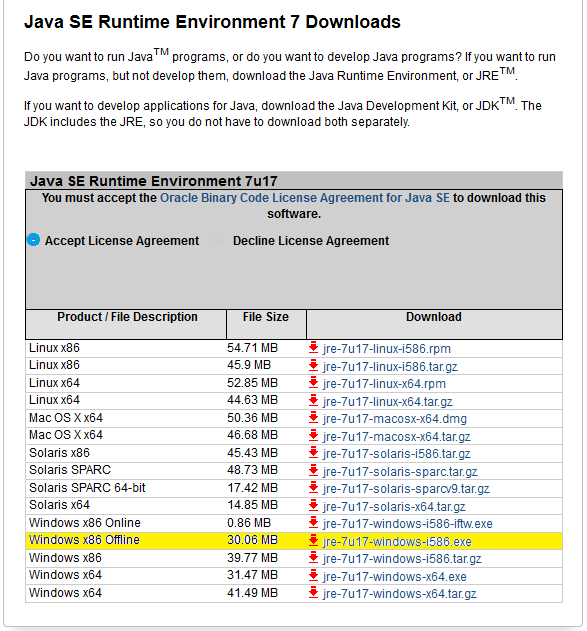
- Run the setup file and restart your browser.
For Linux os user
- To check whether your browser is 32/64 bit go to this link
- Accordingly download the particular setup file from this link
- Install setup file and restart your browser.
- Select java base experiment to perform.
- The following security warning will appear
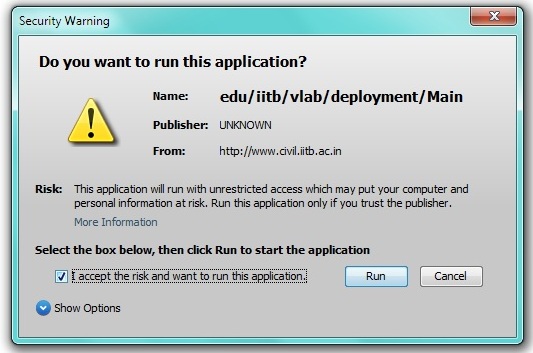
- Accept the risk and click run.
- Again, another warning will appear as follows:
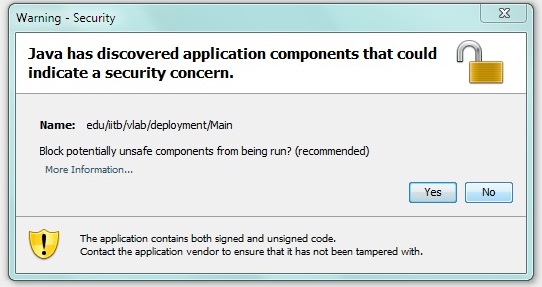
- Click on "No".